Verified Timesheets: How to Simplify Payroll for Remote Teams
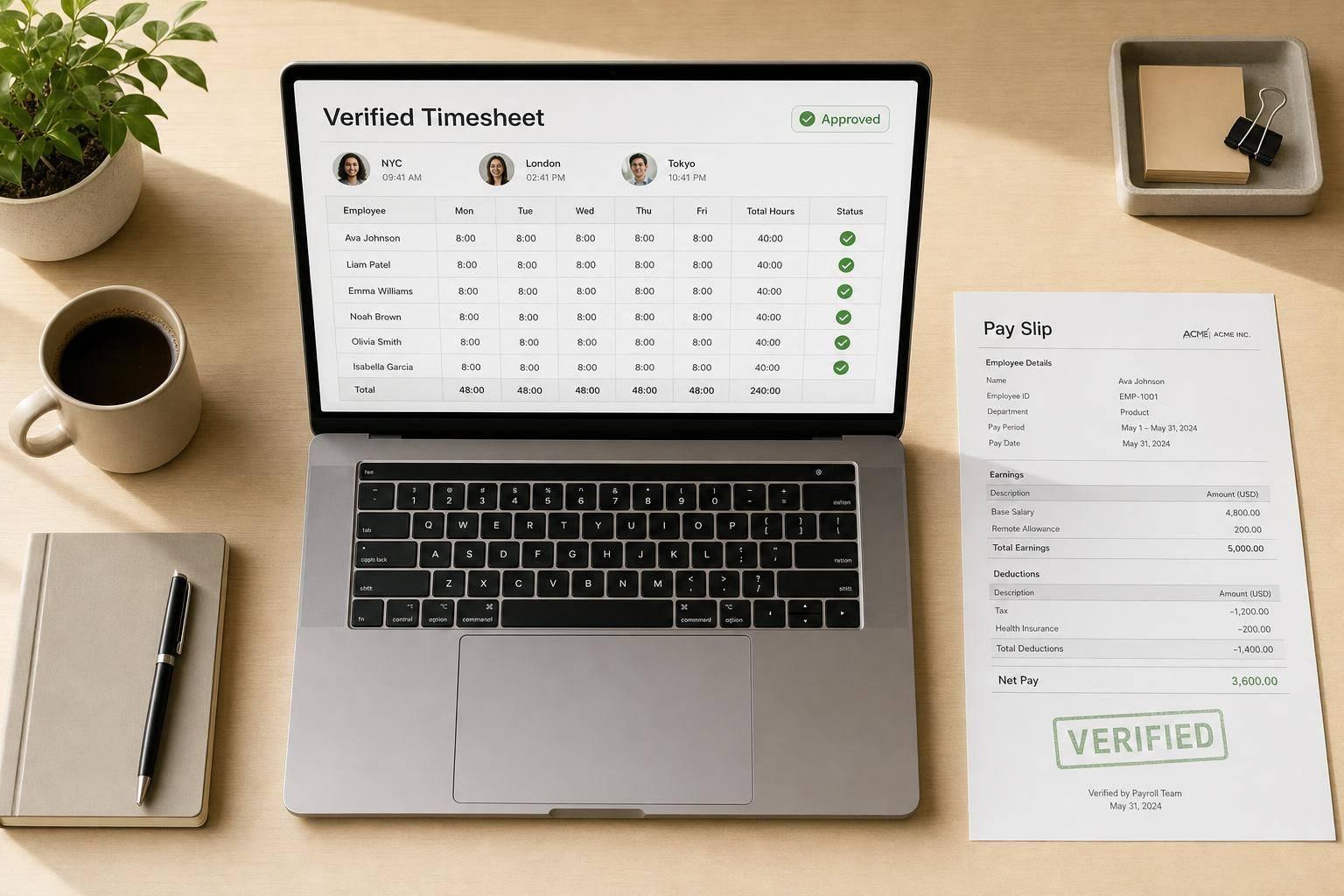
Verified Timesheets: How to Simplify Payroll for Remote Teams
If your team can’t trust time records, payroll slows down and errors pile up. A simple verified timesheet process helps you cut disputes, lock hours before payroll, and keep a clear record of every edit.
Here’s the short version:
- Payroll errors are common: about 54% of U.S. workers are affected, and each fix costs about $291
- Manual cleanup takes time: often 2 to 4 hours per pay period, or 50+ hours a year
- Verified timesheets work because they add proof: employee review, manager approval, edit history, and locked pay periods
- Remote teams need a set flow: daily logging, employee check, manager review, correction window, and payroll export
- Most disputes come from small issues: missed clock-outs, skipped breaks, overlaps, and wrong project codes
- Good setup matters: overtime, breaks, project codes, and post-payroll locks should match pay rules
In other words: verified timesheets turn messy hour logs into payroll-ready records. I’d use one clear process every pay period:
- Employee logs time daily
- Employee checks and submits the timesheet
- Manager reviews flags and edits
- Final approval is recorded
- Payroll exports only locked records
A fixed deadline also helps. For example:
- Employees submit by Friday, 5:00 PM
- Managers review by Monday, 12:00 PM
- Rejected timesheets are fixed within 24 hours
What matters most is simple: no silent edits, no memory-based backfilling, and no payroll run built on half-checked hours. When each change has a timestamp, a name, and a reason, payroll gets easier to run and easier to defend.
That’s the core idea behind this article: use verified timesheets to cut payroll friction for remote teams without adding extra admin work.
Best Time Tracking Software for Remote Teams in 2026
sbb-itb-338a5ab
What Makes a Timesheet Verified
A verified timesheet isn’t just a completed form. It’s an evidence chain: the employee confirms the record is correct, a manager approves the hours, and every change is logged with the original value, the new value, who made the change, when it happened, and why.
Consent-based tracking and employee review
Verification starts with the employee, not the manager. When workers control their own timers by starting and stopping them, the record reflects actual work instead of a backfilled estimate. They should also be able to review punches or daily totals before submission so they can catch missed breaks, bad punches, or other issues while the day is still fresh in their mind.
Verification means the employee certifies the time record is correct before manager approval. That early review helps cut down on payroll fixes later.
If a change is made after a timesheet has been verified, the prior approval should be cleared so the updated record can be reviewed again.
After employee review, the record moves to manager approval.
Approval workflows and audit trails
Once an employee submits, the timesheet goes to the manager for an exception check. The manager looks for issues like manual edits, short shifts, missing breaks, or unapproved overtime. Every approval, rejection, or edit should be logged with who acted, when they acted, what changed, and why.
Once a timesheet is approved, lock the pay period so late edits don’t change payroll totals.
Those logs give managers the context they need when hours need to be checked.
Supporting evidence without replacing pay decisions
Supporting records like optional screenshots or task logs can help settle disputes fast, but they should not replace payroll policy. Use evidence to explain the hours, not to make pay decisions on its own.
Those verified records are what make payroll faster and cleaner.
How Verified Timesheets Simplify Payroll Processing
From approved hours to payroll-ready records
Once a timesheet is approved and locked, it’s ready for payroll.
That gives payroll one record to rely on instead of a pile of loose updates, side notes, and last-minute edits. Approved, locked hours cut the guesswork that tends to show up right before payroll runs. And because the same record can also support client billing, teams don’t have to spend extra time cleaning up spreadsheets first.
The result is simpler handoff between teams and less back-and-forth before payroll starts.
Less follow-up, fewer corrections, faster payroll runs
When there’s one approved record in place, payroll usually has fewer fixes to deal with.
Verified timesheets shift review earlier in the process. That matters. A manager can spot a missing punch or the wrong project code before payroll closes, instead of leaving payroll to sort it out later. So rather than rebuilding each shift from scattered details, payroll can focus on confirming that everything is complete.
In plain terms, payroll teams can work from reviewed, locked records instead of spending their time cleaning up exceptions after the fact.
A Practical Approval Workflow for Remote Teams
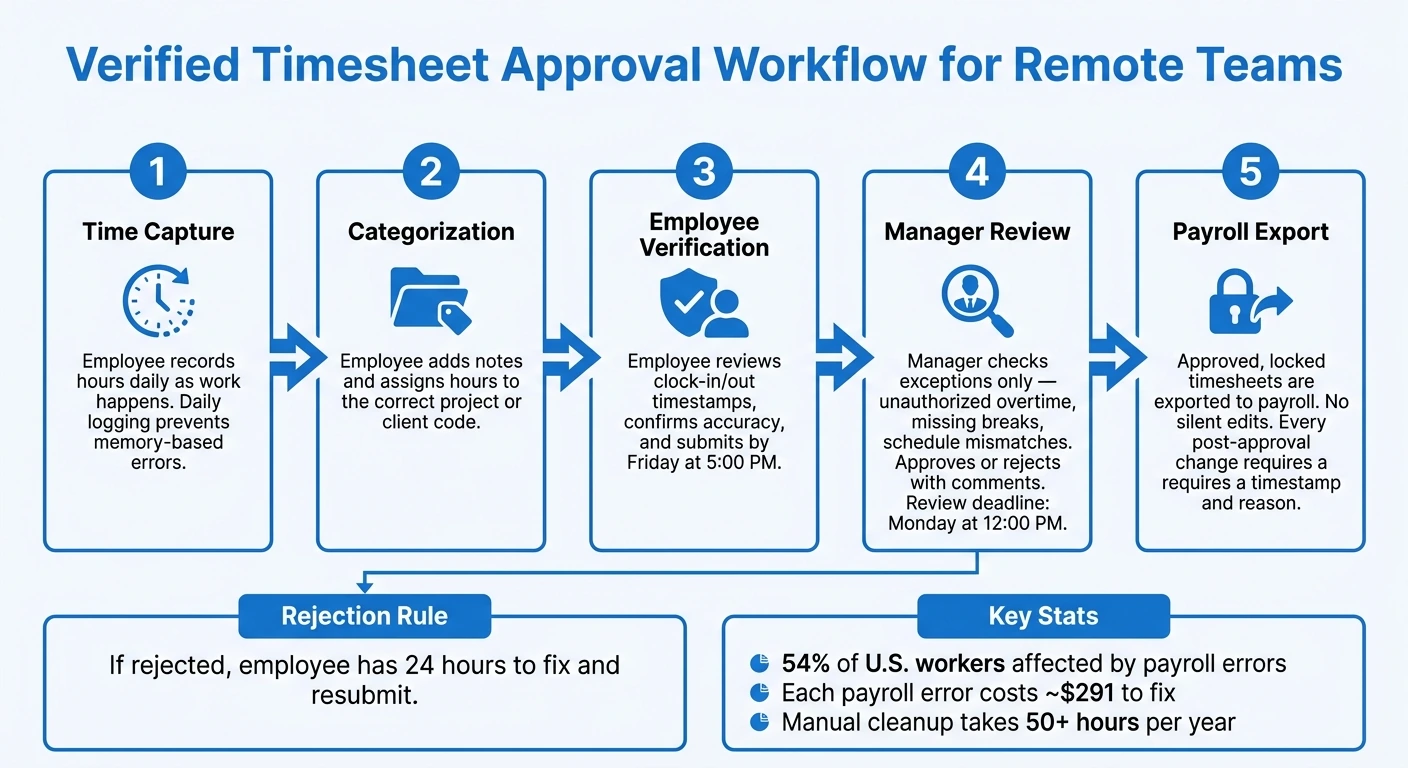
Verified Timesheet Approval Workflow for Remote Teams
Once timesheets are approved and locked, payroll gets a lot easier to run. The best setup for remote teams is simple: use the same review path every pay period, stick to it, and avoid last-minute cleanup.
The five-step review and approval flow
Here’s the standard flow: employee entry, manager review, employee correction, final sign-off, and payroll export.
It usually works like this:
- Time capture - The employee records hours each day as work happens. Daily logging cuts down on memory-based mistakes.
- Categorization - The employee adds notes and assigns hours to the right project or client code.
- Employee verification - Before submitting, the employee checks clock-in and clock-out timestamps or task logs and confirms the record is accurate.
- Submission - The employee sends in the finished timesheet by the set deadline.
- Manager review - After submission, the manager checks exceptions instead of reviewing every minute. That means looking for unauthorized overtime, missing breaks, or schedule mismatches, then either approving the timesheet or sending it back with clear fixes.
This approach keeps reviews focused. Managers aren’t stuck checking routine entries line by line. They only step in when something looks off.
Set a cutoff before payroll closes
A fixed cutoff keeps the workflow from drifting across time zones. A loose deadline like "Friday" leaves too much room for confusion. "Friday at 5:00 PM" works.
For a weekly pay cycle, a solid rhythm looks like this: employees submit by Friday at 5:00 PM, managers finish reviews by Monday at 12:00 PM, and payroll processes after that. That gives the payroll team a clean window to work in, with no chasing people down and no guessing whether edits are still coming.
Automated reminders help keep submissions on schedule.
If a manager rejects a timesheet, give the employee 24 hours to fix it and resubmit. Without that firm turnaround, corrections tend to drift, and payroll slows down.
Any change made after final sign-off should include a documented reason and a timestamp. No silent edits. That paper trail gives managers a fast way to settle disputes later.
Common Timesheet Disputes and How to Prevent Them
Even with approvals and cutoff times, disputes still show up. In most remote payroll cases, the cause is simple: a missed clock-out, overlapping entries, a skipped break, or the wrong project code. Small errors like these can gum up payroll fast and lead to back-and-forth. That’s why verified timesheets - reviewed by the employee, approved by a manager, and locked after sign-off - matter so much. They help stop problems before they spread.
Use timestamps and history to resolve disputes quickly
When a dispute comes up, a clear edit trail usually settles it fast. Every timestamped change should show four things:
- what changed
- who changed it
- when it changed
- why it changed
The why matters more than many teams think. A specific note like "forgot to clock out at 5:07 PM" is much stronger than something vague like "fixed time". Weeks or months later, that extra detail can make the record easier to defend. If a time entry is challenged, optional task logs or screenshots can back up the edit history.
It also helps to return the timesheet to the employee with a comment instead of making a silent edit. That keeps the record open and clear for everyone involved.
Align tracking settings with payroll policies
The best way to stop repeat disputes is simple: make sure tracking rules match payroll policy. If teams keep arguing about overtime, breaks, or billable hours, the setup often doesn’t line up with how pay is supposed to work.
| Policy Requirement | Tracking Setting | Payroll Outcome |
|---|---|---|
| FLSA Overtime | Fixed 168-hour workweek + 40-hour alerts | Accurate overtime calculation and fewer manual errors |
| Meal/Rest Breaks | Flag breaks under 30 minutes | Short breaks are treated as paid time |
| Billable Work | Required project/task codes | Accurate client invoicing and project cost tracking |
| Record Integrity | Lock approved hours after payroll closes | Prevents late edits from changing totals after payroll runs |
When tracking settings line up with policy, the system can catch issues on its own. Managers then review exceptions instead of checking every single line. Payroll also moves with less friction because the data is cleaner before it gets there.
Conclusion: Verified timesheets reduce payroll friction
The payoff is straightforward: fewer corrections, faster payroll, and a clear paper trail. That’s how verified timesheets cut payroll friction for remote teams.
How do verified timesheets reduce payroll errors?
Verified timesheets cut payroll errors because they turn raw work hours into a record you can trust before payroll runs. That means less manual entry, fewer hand-fix mistakes, and a much lower chance that bad data slips into paychecks.
They also help teams catch problems early, such as missing punches, wrong task mapping, and overtime that wasn’t approved. On top of that, they create a timestamped audit trail that shows the work, the review steps, and any changes made along the way. Once a timesheet is approved, it can be locked so no one edits it later and throws payroll off.
What should happen if a timesheet is changed after approval?
If a timesheet needs changes after it’s been approved, those changes shouldn’t happen quietly or through side messages. The timesheet should be reopened or rejected so the employee can fix the issues the manager pointed out and stay the person responsible for the record.
Once the employee makes the correction and submits it again, the timesheet should move through the approval process one more time. The audit trail should keep the full history: the first approval, what changed, why the update was made, and the new sign-off.
How can remote teams handle timesheet disputes faster?
Remote teams deal with timesheet disputes much faster when they use a structured, automated approval workflow that records proof at the moment time gets entered.
Instead of rejecting the whole timesheet, managers can reject specific line items and leave notes on what needs to be fixed. That makes it easier for employees to correct mistakes and resubmit without going back and forth.
Audit trails that log edits, rejections, and approvals also give everyone a clear record to check when something doesn’t match up.