Stealth vs Transparent Monitoring: Policy Guide
Stealth vs Transparent Monitoring: Policy Guide
If you monitor employees, the safer policy choice is open monitoring, not hidden monitoring. In this guide, I compare the two approaches across 5 policy areas: notice, consent, employee review rights, manager access, and time tracking use.
Here’s the short version:
- Stealth monitoring means workers are tracked without being told.
- Transparent monitoring means workers are told before tracking starts.
- Hidden tracking can lead to lower trust, more pushback, and weak time records.
- Open tracking sets clear rules on what is collected, when tracking runs, who can view it, and how long data is kept.
- A strong policy should also cover work-hour limits, data types, blocked data, retention, review rights, and discipline limits.
In plain terms: if people do not know they are being tracked, problems tend to grow. If they know the rules, can see their data, and can control when tracking is on, time tracking is usually easier to use and easier to defend.
Quick Comparison
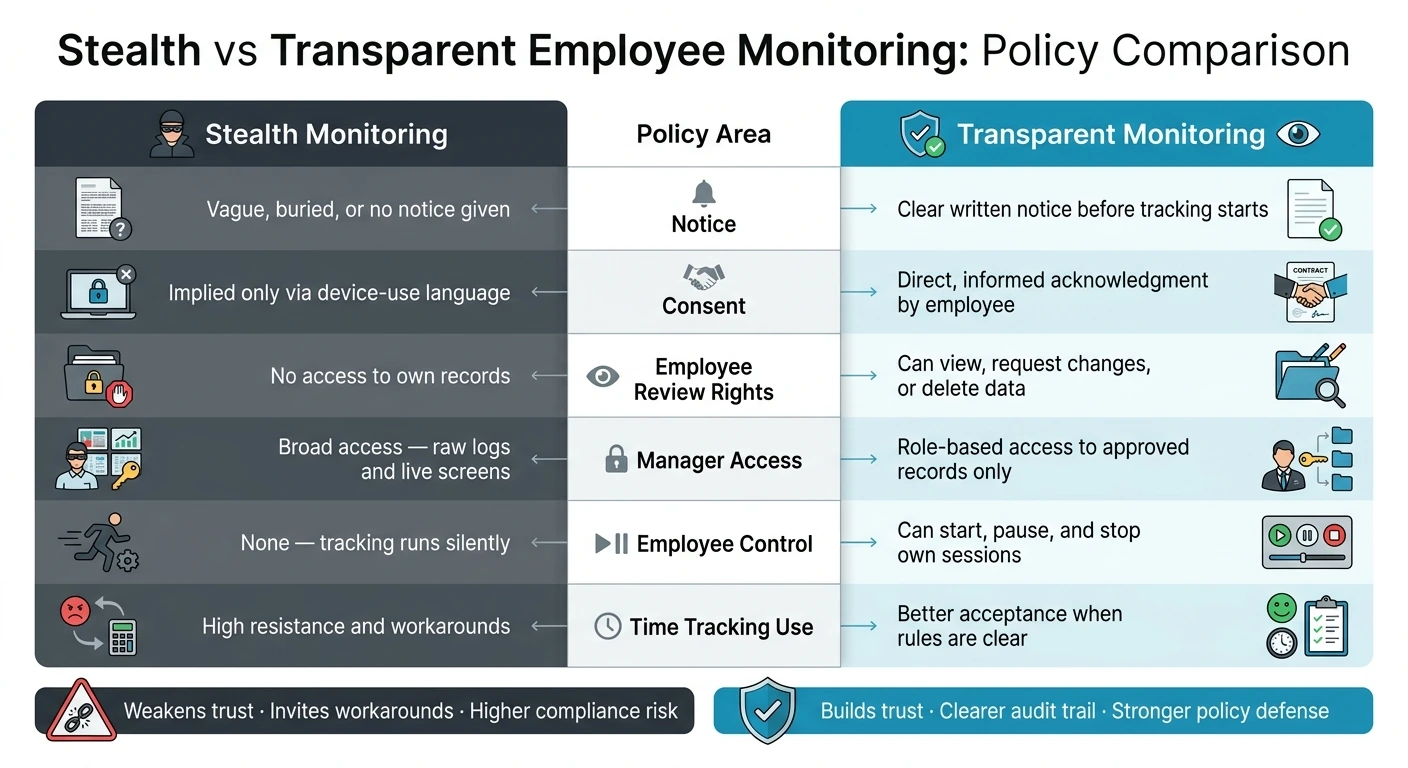
| Policy Area | Stealth Monitoring | Transparent Monitoring |
|---|---|---|
| Notice | No clear notice, or notice is buried | Clear written notice before tracking |
| Consent | Implied only | Direct acknowledgment |
| Employee review | No access to their own records | Can view records and may request changes |
| Manager access | Broad access to raw logs or screens | Limited access based on role |
| Employee control | No start/stop control | Can start, pause, and stop sessions |
| Time tracking use | More resistance and workarounds | Better acceptance when rules are clear |
One more point matters: a written policy is not enough on its own. The software has to match the policy. If your rule says tracking only happens during work hours, the tool should let employees start and stop their own sessions.
That is the core difference this article explains.
Stealth vs Transparent Employee Monitoring: Policy Comparison
2. Stealth Monitoring and Transparent Monitoring: Plain Definitions
Stealth monitoring in policy terms
Stealth monitoring means tracking employee activity on company systems without telling workers it's happening. There’s no notice, no consent request, and no sign on the screen that tracking is on. What makes it stealth isn’t the kind of data collected. It’s the fact that people aren’t told.
In practice, the software runs quietly in the background and gathers data such as keystroke logs, screenshots, app usage, and real-time activity records.
From a policy angle, that lack of disclosure is the line that separates stealth monitoring from other approaches. In the U.S., that can create privacy, trust, and compliance risk.
Transparent monitoring flips those conditions.
Transparent monitoring in policy terms
Transparent monitoring means employees are told before tracking starts what is collected, why it is collected, who can access it, and how long it is kept. Workers can also see when tracking is active. A well-written transparent monitoring policy spells out what is collected, why, who can access it, and how long it is kept. In day-to-day use, these policies usually apply only during work hours.
One consent-based example is AllyTracker: employees control their timers, review screenshots before sharing, and see their own dashboards. That employee control and review are what make the policy transparent.
The biggest differences come down to notice, consent, access, and time tracking.
sbb-itb-338a5ab
3. Stealth vs Transparent Monitoring: Side-by-Side Policy Differences
The table below shows the policy gaps that shape notice, consent, access, and time tracking.
| Policy Area | Stealth Monitoring | Transparent Monitoring |
|---|---|---|
| Notice | Vague, delayed, or buried in broad company-device language | Advance written notice with explicit employee acknowledgment |
| Consent | Implied by company-device language; no session-specific agreement | Informed participation; employees actively acknowledge specific data collection |
| Employee Review Rights | None; data flows directly to management | Employees can view data stored about them and, where the policy allows, request deletion |
| Manager Access | Raw feeds - keystrokes and real-time screens | Role-based access; managers see only approved records or specific dashboards |
| Employee Control | None; tracking runs without employee awareness or input | Employees can start, pause, or end sessions and review collected data |
| Time Tracking Use | High resistance; increases workarounds | Stronger acceptance when boundaries are clear and enforced |
These policy differences show up most clearly in three areas: notice, data access, and day-to-day time tracking.
Employee notice and consent
Stealth policies often lean on broad device-use language. But that kind of language may never spell out what is being collected, when tracking starts, or who gets to see it.
Transparent monitoring is much more direct. It uses advance written notice that names the data collected, the reason for collecting it, and who has approved access. Employees acknowledge the policy before tracking begins. So consent isn't left to guesswork. It's explicit.
Employee review rights and manager access
With stealth policies, employees usually can't see what was recorded. The data goes straight to management.
Transparent policies handle this in plain terms. Employees can view the data stored about them, and role-based access means managers only see what they're allowed to see - not raw keystroke logs or live screens. For example, employees can review screenshots before sharing, and managers see only approved galleries.
That changes the day-to-day feel of monitoring. Instead of a one-way feed to management, there are clear limits on who sees what.
Effect on time tracking use
Stealth monitoring often backfires when time tracking is part of the mix. If employees don't know what's being recorded - or think it's everything - resistance goes up. People start looking for workarounds.
Transparent monitoring tends to get a better response because the limits are clear. If employees know tracking applies only during work hours, and they control their own session data, acceptance improves and timesheets are easier to trust.
Those boundaries need to be written into the policy in plain English.
4. How to Write a Transparent Monitoring Policy
Section 3 covered the policy gaps. This section turns those gaps into rules people can read, follow, and point to later.
Policy clauses to include
Use these clauses to turn the notice, consent, access, and time-tracking differences from Section 3 into policy language that can actually be enforced.
- Business purpose - State the exact reasons for monitoring, such as payroll accuracy, project billing, or productivity analysis.
- Systems covered - Name the software and devices in scope. Also spell out whether monitoring applies to company-owned devices, personal devices, or both.
- Work-hours limits - Confirm that monitoring runs only during active, employee-initiated sessions.
- Data types collected - List all collected data, including screenshots, app and website usage logs, and real-time activity data. If keystroke logging or location tracking is used, say so directly.
- Prohibited data - Define what will never be collected, such as personal passwords, private messages, and financial account information.
- Retention period - Specify how long data is stored before permanent deletion.
- Access rules - Name who can view monitoring data and under what conditions. Role-based access should be the default.
- Review and correction process - Give employees a clear way to view their stored data and request corrections or deletion of non-work-related screenshots.
- Disciplinary limits - State that monitoring data cannot be the sole basis for a performance review or disciplinary action. That helps prevent monitoring from turning into a hidden discipline shortcut.
How consent-based tracking works in practice
These clauses matter only if the software follows them.
A consent-based system like AllyTracker can support that setup. Employees start, pause, and end their own timers. Tracking does not launch automatically or through a remote admin command. Screenshots first go into a private screenshot review queue, and employees can remove any screenshot before it reaches the manager's approved gallery.
That match between policy and software is the difference between saying you're transparent and showing it.
When the written policy lines up with the software workflow, employees can see the rules at work.
5. Conclusion: The Safer Policy Choice for Trust and Accurate Time Tracking
When policy and software line up, transparent monitoring is the safer choice. It sets clear expectations about when tracking happens and why. It also steers clear of covert monitoring, which can weaken trust and push people toward workarounds.
Time tracking should support payroll and workflow control, not hidden surveillance. When employees know they’re tracked only while on the clock, and decisions are based on usage data instead of guesswork, the boundaries are clearer and the audit trail is stronger.
In day-to-day use, AllyTracker follows that consent-based model. Employees start, pause, and stop timers themselves. They can review screenshots before sharing them. Managers then get approved screenshot galleries and verified-pay timesheets.
Is transparent monitoring legally safer?
There isn’t a clear answer in the available information. The sources don’t say whether transparent monitoring is legally safer under U.S. law.
The only related point is that AllyTracker puts the focus on consent-based monitoring, with employee-controlled timers and screenshot review before sharing.
What data should a monitoring policy ban?
A monitoring policy should ban collecting or using the most invasive employee data unless the employee has agreed to it and the scope is clearly limited.
That includes keystroke logging, real-time user activity monitoring, screen monitoring or recording beyond what’s needed for approved time tracking and billing, and continuous GPS or location tracking for monitoring purposes.
Can employees dispute inaccurate tracking records?
Yes. With AllyTracker’s consent-based monitoring, employees can review screenshots and personal tracking data before managers see it.
That gives employees a chance to challenge mistakes before records are finalized for review.